Monday, April 3, 2017
How to refill ink for canon printer pixima iP 4300
How to refill ink for canon printer pixima iP 4300
How to refill ink for canon printer pixima iP 4300
Available link for download

HP 4G Murah dari Smartfren
HP 4G Murah dari Smartfren
Boleh dikatakan saya merupakan pengguna setia smartfren sejak tahun 2007 silam meski bergonta ganti nomor dengan alasan hanya ingin mendapatkan bonus akses data nya saja, dari jamannya Haier C700 dengan koneksi internet EVDOnya hingga sekarang yang sudah berteknologi 4G.
Selain memanjakan para pelanggan dengan berbagai bonus akses data, telepon dan sms, ternyata smartfren selalu mengapresiasi pelanggan setianya dengan berbagai diskon produk terbaru. "Tukarkan handset anda dengan Produk terbaru cukup membayar rp. sekian...".
Handphone seharga Rp. 1.299.000 hanya cukup dibayar Rp. 299 ribu.
Ya, salah satu promo terbaru yang saya dapatkan dari Smartfren adalah ada diskon harga untuk pembelian Andromax Q yang harga aslinya Rp. 1,2 jutaa cukup dengan membayar Rp. 200 ribuan, tepatnya dari Rp. 1.299.000 menjadi Rp. 299.000, namun kali ini tidak menukarkan handset lama, melainkan cukup menunjukan SMS yang saya dapat dari smartfren ke Galeri Smartfren Terdekat.Mengunjungi Gerai Smartfren
 Kabetulan ketika mendapat SMS promosi tersebut saya sedang berada diluar rumah bersama keluarga, kami pun mampir ke gerai Smartfren yang ada di Cianjur meski Nomor yang saya gunakan adalah nomor Bandung.
Senyum ramah kedua petugas di Galeri Smartfren Cianjur mempersilahkan kami, kami pun langsung bertanya mengenai SMS promo produk yang saya dapat. Seneng juga ketika mendengar jawaban bahwa SMS yang saya terima termasuk promo produknya adalah benar adanya.
Sayapun langsung melihat lihat produk promo yang ditawarkan smartfren tersebut, mulai dari spesifikasi hingga harga belinya, berikut ini ulasan singkat produk promo terakhir dari smartfren yang saya terima :
- Produk : Andromax Q
- Spesifikasi : Processor Quad Core 1.2GHz, Layar 4.5 inch, Camera 5MP AF/2MP FF, 1gb Ram + 8Gb Rom
- Pilihan Warna : Hitam dan Putih
- Harga Jual : Rp. 1.299.000
- Harga Promo : Rp. 299.000,-
Alasan memilih Smartfren
Seperti yang saya sebutkan sebelumnya bahwa saya menggunakan smartfren sejak tahun 2007 silam, alasannya adalah karena biaya Nelpon dan SMS cukup murah dan yang lebih penting karena biaya Akses data yang jauh lebih murah daripada provider lain.Meski sering dicibir oleh para penggila HP branded, saya tetap tegar saat itu... "Hari gini pake smartfren?" begitulah kira-kira... bahkan pernah mendengar cemoohan dari seorang pelayan toko wara laba ketika salah satu temannya memakai Smartfren Andromax "Hari gini pake andromax?", kata salah satu dari mereka sambil cengar cengir.
Sekarang saya sudah sering melihat orang-orang menggunakan HP smartfren, ketika kutanya kenapa.. alasannya hampir sama, terlebih saat ini smartfren menggunakan teknologi 4G serta menyediakan paket internet True unlimited, bener-bener true unlimited. silahkan baca disini.
Available link for download
Sunday, April 2, 2017
How to restrict users logon hours using netuser
How to restrict users logon hours using netuser

You can easily restrict your users from logging in to your system,or allowing the users to login only for specific hours.To restrict a users logon hours , use the net user commands. These commands are used from the Command Prompt. (Start - RUN - and type cmd)
Below are some examples:
1 - net user mishal /time:M-F,08:00-17:00
2 - net user micheal /time:M-F,8am-5pm
3 -net user realhackers /time:M,4am-5pm;T,1pm-3pm;W-F,8:00-17:00
4 - net user chris /time:all (this one means this user can always log on)
Note:You can only restrict when a user can log on to the system. On a stand alone computer, there is no way to force a user to log off when their hours expire, without a third party script or software.
Available link for download
How to Vectorize a Sketch with Transparent Layer Technique in Illustrator
How to Vectorize a Sketch with Transparent Layer Technique in Illustrator
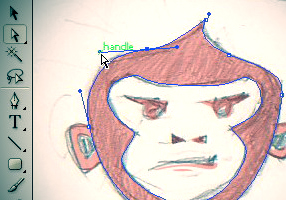
There are many kind of techniques to vectorize a sketch. For complex illustration, you can use tracing technique, or live tracing which are quite complicated in process. Youd probably have to spend longer time in inking your illustration before you scan it and continue the digital process. If your sketched design is simple, symmetrical and appears with enormous geometrical shapes, you can just rely on vector shapes tool (Rectangle Tool, Ellipse Tool, etc.) to get it done.
In this this quick tip tutorial, Ill show you how to vectorize shapes based on a sketch with the help of layer opacity in Illustrator. I think it would work for any complex illustration, but todays tutorial is a bit different. This is because vectorizing always take intensive uses of Pen Tool so its going to be better if you see a short visual demonstration in a video for that. To get better view, I suggest you to see the videos tutorial in full screen mode.
Read More
Available link for download
IcoFX Full Version Free Download for Windows
IcoFX Full Version Free Download for Windows
Description and overview of Icon and Cursor maker:
Download free best icon maker and cursor maker software for Windows and MAC OSX. So download IcoFX v2.13 Multilingual + Keys the best Professional image editor software latest version for Windows and Linux operating system. Free Download IcoFX full version for windows is a professional icon and cursor editor software that are used to create and edit images with transparency for your Windows XP, Windows 7, 8, 8.1 and Windows 10 as will as Macintosh operating system.

What is IcoFx latest version?
Download IcoFX Crack the professional Icon Editor is an amazing and award winning pro software for icon and cursor editor. This software allow are user to edit their Windows and MAC OS Icon and Cursor editing and modification or maker software. So it is an all-in-one solution for your computer icon creation, extraction, and editing. So download free IcoFX portable that is specially designed to work with Windows XP, Vista, Windows 7, Windows 8 and Macintosh icons supporting transparency.

Now you can create logos and-and Windows icons up to 256×256 for Windows and Macintosh OS icons up to 1024×1024 Resolution for Macintosh. As will as you can be added some other effects With this app like download IcoFX Registration keys Pro full version free download and get more the 40 facts at your fingertips, theres virtually no limit to the icons you can create

There are a lot of Free download IcoFX 2.2 full serial pro with crack features collection of intuitive color correction tools. That are given below. So using these tools you can fine-tune hue, saturation, and luminance, adjust color levels, brightness, and contrast. You can easily work with multiple files using the batch processing capability of IconFX Freeware. As will as download logo maker software for windows and Create, convert, extract or export all your icons or cursors with just a few clicks.

If you are an MAC User, then you can also convert your Macintosh icons to Windows icons and vice versa. Its support for static and animated cursors. It means that now you can create a favicon for your website or blog. IcoFX free download windows 7 with keys that allows you to rearrange, blend layers and change their opacity. Free Download IcoFX full with keygen will give you the possibility to create icon libraries or change icons inside exe files. So if you like this software then follow given below method.
Key features of IcoFX Pro full version:
- Create icons and cursors Windows and Macintosh.
- Support for Windows Vista icons with PNG compression.
- Convert your Macintosh icons to Windows icons and vice versa.
- Support for static and animated cursors.
- Create a favicon for your website or blog.
- Import, export and extract your favorite images into icons or cursors, or icons into images.
- Supported image formats BMP, PNG, JPG, JPG2000, TIF and GIF.
- Image objects icon creation has never been easier.
- Batch process files easily work with multiple files.
- Create, convert, extract or export all your icons or cursors with just a few clicks.
- Create and edit icon and cursor libraries using the built in resource editor.
- Using the resource editor you can also change icons inside exec files.
- Changing layer visibility will not select the layer.
- Saved images are also added to the recent files list.
- Could not draw equilateral shapes using shift when zoom < 100%.
- Supported for Windows all edition and version.
- Easy to used and attractive user interface.
How to download Install and activate IcoFx full version into windows?
- First of all you need to follow the given below links and download it.
- After downloading complete you need to use WinRAR to extract.
- Now install setup into windows and use given keys to activate.
- Use keys for Business, Home and site licence key to registred software.
So friends if you like to download this software then follow given below links and download into your Pc. As will as if you like my work then share it on your facebook friends timeline and tag it.
link|link2|link3|link4
Available link for download
Subscribe to:
Posts (Atom)
Since I design logos quite often, this quick technique helps me a lot and I guess everyone can use it without hassle. Start to create new layer after you lock your sketch graphic layer. Then start to add vector shape with Ellipse or Rectangle Tool. Adjust the layer opacity to get transparent effect. Set it in your desired value, Im convenient to have it in 15% layer opacity. In this way, you can freely drag the anchors path handle with the reference of your locked layer sketch and have full visual control in this vectorizing process.
After youre done with one vector shape in its correlated layer, lock this layer and repeat the step for another part of the sketch that you wish to vectorize. Pathfinder Tool is handy enough to help you modify more than one vector shapes into single shape or any kinds of shapes that you wish to see.
Below is a quick demo that visually explains how to subtract two vector shapes area using Minus Front pathfinder tool in Illustrator.
UPDATE:
The result from this quick vectorizing process is a new logo, which I call Apetive.
Related Post: