Showing posts with label smr. Show all posts
Showing posts with label smr. Show all posts
Friday, March 24, 2017
How To Use Two Dual Whatsapp Account On Android Device Smr Trixx
How To Use Two Dual Whatsapp Account On Android Device Smr Trixx
How To Use Two/Dual Whatsapp Account On Android Device Smr Trixx
As Whatsapp is commonly used and popular messenger apps for smartphone device. It is available for almost all mobile platform including Android, IOS, Symbian etc. With the help of whatsapp we can send text, images, Audio, video etc to our friends, relatives. Whatsapp have some limitations link we cant send few important files like pdf, doc and more. In our previous article we also solve this problem which was about how to share apk, pdf, doc, zip files on whatsapp. Another reason for the popularity of whatsapp is its new feature like whatsapp free calling. Whatsapp have few security and privacy issues but their multiple ways which help us like i have explained about how to hide images and video from phone gallery. This just because whatsapp dont support cloud storage for media files at this moment. So that is all the datable of database of whatsapp is stored in device. Something we accidentally got delete phone data. Along with whatsapp database also got deleted then all the chat, files become inaccessible. So i recommend to read how to restore deleted messages from whatsapp.
Today in this tutorial we are going to discuss about using two whatsapp account on same device. Usually we use Android phones which have Dual Sim functionality. But whats app allow you to create only one Account on one Device. We can create two whatsapp account for our both number but we cant access them at same time on same device. In some condition we use two number like one for profession and second one for family. We want to keep in touch with both whatsapp account. If you also suffering from this problem then this article is really for you. Today we explain how to Use dual whatsapp account on single Android device.
Methods To Run Multiple WhatsApp Account
Method 1:- Dual Whatsapp By Using WhatsMapp Solo
WhatsMapp solo is an Amazing App. By using this App we can Easily create another Whatsapp account on the single Android device. It provide custom icons, Status bar color changing in Lollipop version. Its one of the important feature is it is a antiban App.

Steps To Create Account On WhatsMapp Solo
1. First you have to download this App and install into your Android phone. you can download it from the button shown below.

3. If you face some problem then you should backup and remove the original whatsapp and after that install this App.
Method 2:- Dual Whatsapp By Using OG WhatsApp

Steps To Create Account On OGWhatsapp
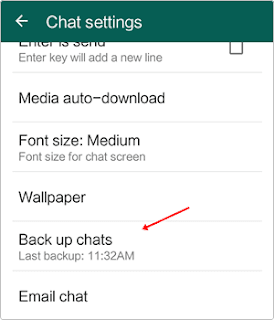
1. First you have to backup your chats from the Whatsapp settings. You have to go to WhatsApp settings >> chat settings >> Back Up chats.

4. Uninstall your original whatsapp.
5. Now you have to download this App and install into your Android phone. you can download it from the button shown below.
7. Download original whatsapp create/ restore your old account. Now you have dual Account.
Note:- In some devices second method may or may not works then i recommend to try first method.
Available link for download

Wednesday, February 15, 2017
How To Run Android Apps Free On PC Laptop 2015 Smr Trixx
How To Run Android Apps Free On PC Laptop 2015 Smr Trixx
How To Run Android Apps Free On PC/Laptop - 2015 Smr Trixx
 Android becomes one the famous and commonly used mobile operating system. Just because android OS is available in all range of smartphones. Use android marketplace like Google playstore to access apps for different purpose like games, business, ebook and many more. Android marketplace have millions of different application based on number of different categories. These all apps are created by developers who are interested in android marketing. Almost 80% apps are free to use but some of them are paid. We also wrote about how to download paid android apps for free.
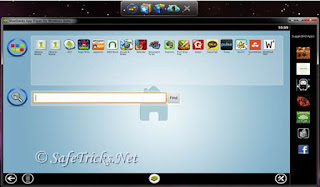
 Now here i am going to discuss about how you can use android apps on your windows OS. If you are really fond of using android applications but unfortunately you dont have any android Phone. Then dont worry this article will helps you make your dreams come true. In these days Bluestacks is one of the famous and working Software Which is PC emulator and help to use android apps in Windows. Recently i also publish about using download Candy crush on PC which is also an amazing game.
Steps To Use Android Apps On PC
- First of all download Bluestacks from here.
- Now Install Bluestacks on your PC.
- After the successful installation Open your Bluestacks.
- Now Bluestacks is ready to use, Its helps to access any android file with .apk extension in windows OS version.
- If you dont have any apps saved in your PC then you can directly download it from Bluestacks.
- Now open your Bluestacks and their is available search box in center or otherwise on the right corner.
- Simply type the name of any android apps which you want to use on PC.
- Now Download your apps by using Bluestacks and your apps is ready to use.
-
Requirement To Run BlueStacks
Make sure that your PC Supports minimum requirements to use Bluestacks. It required minimum Window Xp SP3 or any Higher OS with high inbuilt graphic memory or Graphic card or make sure that your PCs VGA drivers are updated if you already have inbuilt memory.
At last i hope you really enjoy this trick. If you find it working then dont forget to share it others also. If you feel any doubt or having problem in this article. Its my pleasure to help you.
Available link for download
Friday, December 2, 2016
How To Share Zip Doc Pdf Apk Files On Whatsapp 2015 Smr Trixx
How To Share Zip Doc Pdf Apk Files On Whatsapp 2015 Smr Trixx
How To Share Zip, Doc, Pdf, Apk Files On Whatsapp - 2015 Smr Trixx

Whatsapp is one the most popular messages app for smartphone. Whatsapp becomes most of addicted because of its amazing features like chatting, calling, status, profile and many more. Whatsapp becomes famous after android smartphones are commonly used worldwide. Android devices are popular due to their amazing features and low cost. Android OS is based on Linux and hardware independent due to this reason Android Apps are compatible with different version of Android OS. Everyone use Android Phone because of its features and huge marketplace like Google Play Store. Where we can download apps and games according to different categories.
On Android devices we use various social messengers and social apps like Whatsapp, Facebook, Hike etc to keep in touch with friends and relative. From the list of all, whatsapp is at top. Whatsapp is was not available on PC as software application but we can access it to know check out how to install Whatsapp on PC. We share text, audio, video, images etc with our friends create groups and take enjoy of group chat etc. Dues to huge amount of personal data sometimes it may got deleted. So must check how to recover whatsapp deleted files. Due to these features Whatsapp become the most popular messenger. But whatsapp dont have any online database and store media files into phone storage. So someone can easily access media files so you need to check how to hide images and videos from whatsapp gallery. But the another serious problem faces by users of WhatsApp messenger is that, we cant share PDF, doc, ppt, apk, rar, Zip, xks files on whatsapp. If you also want to know how to share these files data files on whatsapp then do not worry because in this article we provide yosu a trick to share zip, PDF and apk like files on whatsapp with your friends.
Well not spam mate! We promise.


How To Share Zip, Doc, Pdf, Apk Files On Whatsapp - 2015
Whatsapp is one the most popular messages app for smartphone. Whatsapp becomes most of addicted because of its amazing features like chatting, calling, status, profile and many more. Whatsapp becomes famous after android smartphones are commonly used worldwide. Android devices are popular due to their amazing features and low cost. Android OS is based on Linux and hardware independent due to this reason Android Apps are compatible with different version of Android OS. Everyone use Android Phone because of its features and huge marketplace like Google Play Store. Where we can download apps and games according to different categories.
On Android devices we use various social messengers and social apps like Whatsapp, Facebook, Hike etc to keep in touch with friends and relative. From the list of all, whatsapp is at top. Whatsapp is was not available on PC as software application but we can access it to know check out how to install Whatsapp on PC. We share text, audio, video, images etc with our friends create groups and take enjoy of group chat etc. Dues to huge amount of personal data sometimes it may got deleted. So must check how to recover whatsapp deleted files. Due to these features Whatsapp become the most popular messenger. But whatsapp dont have any online database and store media files into phone storage. So someone can easily access media files so you need to check how to hide images and videos from whatsapp gallery. But the another serious problem faces by users of WhatsApp messenger is that, we cant share PDF, doc, ppt, apk, rar, Zip, xks files on whatsapp. If you also want to know how to share these files data files on whatsapp then do not worry because in this article we provide yosu a trick to share zip, PDF and apk like files on whatsapp with your friends.
Method To Share Pdf, Doc, Apk, Zip Files On Whatsapp
Step 1. You have to download the dropbox App first on your Android device. You need a dropbox account if you already have a drop account then no problem otherwise yo to create the account and login to it.


Step 2. Download and install CloudSend App to your device by clicking the button below. After installation launch the App and go through it. This will ask you for the authorization by the end. You have to allow all permissions to this App.

Step 3. After giving permission in our dropbox folder, a folder is created automatically named cloudsend. Now you can close the App after completing the authorization.
Step 4. If you want to send any type of file, hold the file through file manager and click the share button. Now you see a popup menu.

Step 5. From the popup menu press the Cloudsend option. Wait until the selected file is uploaded on the cloudsend folder in dropbox. The duration of uploading will depend on the size of file.
Step 6. Cloudsend App does not allow any restriction regarding the file size and provide two option after uploading the file copy and share. You can share the file or copy the link of any file.
Step 7. Now select share button option. By selecting this option you will be able to share your file in different platform like Gmail, Whatsapp, SMS, WeChat etc.

Step 8. Now choose Whatsapp option to share file with Whatsapp. After selecting this option it will ask for the contacts with which you want to share files. Share the link of file with your friends.
I hope you like this method to share zip, pdf, apk and other files on whatsapp. Dot forget to share it with others.Available link for download
Subscribe to:
Posts (Atom)