Showing posts with label dual. Show all posts
Showing posts with label dual. Show all posts
Friday, March 24, 2017
HTC Desire 526G dual sim D526h 100 Tested Factory Flash File Free Only Member Mina Telecom
HTC Desire 526G dual sim D526h 100 Tested Factory Flash File Free Only Member Mina Telecom


gsmshahalam@yahoo.com
1000%Tested
01780438219
DOWNLOAD HERE
Brand : htc
ProdName : v02_htc_asia_wwe
ProdModel : HTC 0PL4100
Device : htc_v02_dug
AndroidVer: 4.4.2
MTKxCPU : MT6592
MTKxPRJ : 1.02.720.1
[Read Ok] : preloader_huaqin92_cwet_b2_kk.bin
[Read Ok] : MBR
[Read Ok] : EBR1
[Read Ok] : lk.bin
[Read Ok] : boot.img
[Read Ok] : recovery.img
[Read Ok] : secro.img
[Read Ok] : logo.bin
[Read Ok] : EBR2
[Read Ok] : cota.img
[Read Ok] : system.img
[Read Ok] : cache.img
[Read Ok] : userdata.img
[ScatCFG] : MT6592 / V1.1.2 / huaqin92_cwet_b2_kk / EMMC
FW Size : 1254 MiB
ProdName : v02_htc_asia_wwe
ProdModel : HTC 0PL4100
Device : htc_v02_dug
AndroidVer: 4.4.2
MTKxCPU : MT6592
MTKxPRJ : 1.02.720.1
[Read Ok] : preloader_huaqin92_cwet_b2_kk.bin
[Read Ok] : MBR
[Read Ok] : EBR1
[Read Ok] : lk.bin
[Read Ok] : boot.img
[Read Ok] : recovery.img
[Read Ok] : secro.img
[Read Ok] : logo.bin
[Read Ok] : EBR2
[Read Ok] : cota.img
[Read Ok] : system.img
[Read Ok] : cache.img
[Read Ok] : userdata.img
[ScatCFG] : MT6592 / V1.1.2 / huaqin92_cwet_b2_kk / EMMC
FW Size : 1254 MiB

Available link for download

How To Use Two Dual Whatsapp Account On Android Device Smr Trixx
How To Use Two Dual Whatsapp Account On Android Device Smr Trixx
How To Use Two/Dual Whatsapp Account On Android Device Smr Trixx
As Whatsapp is commonly used and popular messenger apps for smartphone device. It is available for almost all mobile platform including Android, IOS, Symbian etc. With the help of whatsapp we can send text, images, Audio, video etc to our friends, relatives. Whatsapp have some limitations link we cant send few important files like pdf, doc and more. In our previous article we also solve this problem which was about how to share apk, pdf, doc, zip files on whatsapp. Another reason for the popularity of whatsapp is its new feature like whatsapp free calling. Whatsapp have few security and privacy issues but their multiple ways which help us like i have explained about how to hide images and video from phone gallery. This just because whatsapp dont support cloud storage for media files at this moment. So that is all the datable of database of whatsapp is stored in device. Something we accidentally got delete phone data. Along with whatsapp database also got deleted then all the chat, files become inaccessible. So i recommend to read how to restore deleted messages from whatsapp.
Today in this tutorial we are going to discuss about using two whatsapp account on same device. Usually we use Android phones which have Dual Sim functionality. But whats app allow you to create only one Account on one Device. We can create two whatsapp account for our both number but we cant access them at same time on same device. In some condition we use two number like one for profession and second one for family. We want to keep in touch with both whatsapp account. If you also suffering from this problem then this article is really for you. Today we explain how to Use dual whatsapp account on single Android device.
Methods To Run Multiple WhatsApp Account
Method 1:- Dual Whatsapp By Using WhatsMapp Solo
WhatsMapp solo is an Amazing App. By using this App we can Easily create another Whatsapp account on the single Android device. It provide custom icons, Status bar color changing in Lollipop version. Its one of the important feature is it is a antiban App.

Steps To Create Account On WhatsMapp Solo
1. First you have to download this App and install into your Android phone. you can download it from the button shown below.

3. If you face some problem then you should backup and remove the original whatsapp and after that install this App.
Method 2:- Dual Whatsapp By Using OG WhatsApp

Steps To Create Account On OGWhatsapp
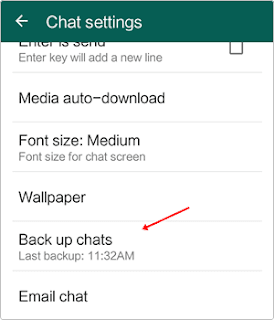
1. First you have to backup your chats from the Whatsapp settings. You have to go to WhatsApp settings >> chat settings >> Back Up chats.

4. Uninstall your original whatsapp.
5. Now you have to download this App and install into your Android phone. you can download it from the button shown below.
7. Download original whatsapp create/ restore your old account. Now you have dual Account.
Note:- In some devices second method may or may not works then i recommend to try first method.
Available link for download
Thursday, March 16, 2017
HTC Desire 326G Dual Sim Flash File Firmware Stock Rom Free Download Latest
HTC Desire 326G Dual Sim Flash File Firmware Stock Rom Free Download Latest
HTC desire 326g dual sim flash files, firmwares, and stock roms free download here. On this page you will be able get latest stock roms for region wise like HTC Asia, HTC WWE VNM, etc. The downloading link which is given below here has been brought you from the official site of HTCdev. The downloading link is a direct downloading link which will provide you full latest stock rom from HTC official source. After following the link below, you have to follow the instructions to complete the downloading process. After completion of downloading it can be used on a specific device.
File Details:
- File for : HTC Desire 326G Dual Sim (Asia, WWE VNM etc)
- File size : 139MB
- Version : v1.76.720.1 Asia, 1.52.707.1 WWE VNM,
- Language : English
- Developers : HTCDEV.COM
- Android Version : v4.4.2
To start downloading stock roms for htc desire 326g dual sim just go below and follow the given downloading links. There are various downloading links has been given to you. Remember that you have to choose your region for downloading the stock rom, flash file, firmware of htc desire 326g dual sim. So, get start under here.
Here you can download htc desire 326G dual sim (Asia, india) Android v4.4.2, MR 2
Here you can download htc desire 326G dual sim (WWE VNM) Android v4.4.2, MR 1
Here you can download htc desire 326G dual sim (Asia) Android v4.4.2, MR 1
Here you can download htc desire 326G dual sim (Asia) Android v4.4.2, CRC
Available link for download
Thursday, January 12, 2017
How to Uninstall Windows 8 on Dual boot With Windows 7
How to Uninstall Windows 8 on Dual boot With Windows 7
If you have Windows 8 on dual boot with Windows 7 and now you decide to remove / uninstall the Windows 8, you need a simple trick to do that.
How to Remove Windows 8 on dual boot ?
First you need the Boot manager tool, i use Easy BCD , go to http://neosmart.net/EasyBCD/ for download easy bcd. Or you can use your other boot manager tools.
Play your Windows 7 and install the boot manager on it
After installed, run the boot manager (I uses Easy BCD)
Choose Edit Boot Menu
Select Windows 8
Click Delete
Save Setting

Now You can delete the partition from the Computer Management menu (Right click on Computer --> choose Manage--> Storage-->Disk Management) or format the drive where Windows 8 installed, if you cant , try the windows to restart first.
If on the drive where Windows 8 installed you have data (not possible to re-partition or format the disk), you can delete Windows 8 folder manually, but take longer time.
Now only a Windows 7 on your Computer.
sumber : http://www.finetrick.com/2013/07/how-to-uninstall-windows-8-on-dual-boot.html
Available link for download
Saturday, November 5, 2016
Instal Ubuntu Desktop 12 10 Dual Boot Dengan Windows
Instal Ubuntu Desktop 12 10 Dual Boot Dengan Windows
Instal Ubuntu Desktop 12.10 Dual Boot Dengan Windows - Instal Ubuntu Desktop 12.10 Dual Boot Dengan Windows - Selamat siang semuanya, pada share kali ini ane mencoba memberika tutorial sederhana ini tentang instal Ubuntu Desktop, oke langsung aja gan lihat caranya di bawah ini :
1. Setting BIOS agar booting ke bootable Ubuntu 12.10 (Baik Lewat DVD/Flashdisk)
2. kemudian jika berhasil akan tampil seperti ini
2. kemudian jika berhasil akan tampil seperti ini

3. Jika anda ingin mencoba terlebih dahulu ubuntu terbaru ini bisa kalian klik try ubuntu jika memang nanti sudah yakin mau install ubuntu ya, ydah langsung aja deh gak pake lama klik install ubuntu
4. tampil form Preparing to install ubuntu ini kita Continue dan klw kita tidak terkoneksi internet maka kita pilih option yang pertama dan lanjutkan instalasi sampai tampil form instalasi Typ

5. Nah hati-hati pada form ini ada 3 pilihan option,
1. option pertama : jika anda ingin install ubuntu dengan sistem operasi lain pilih option ini
2. option kedua : menghapus sistem operasi yang ada dan menggantinya dengan Ubuntu
3. option ketiga : jika anda pengguna tingkat lanjut maka pilih opsi ini karena kita nanti bisa membagi lagi partisi home,root, dan swap ya (bagi yang baru kenal linux pasti binggung tuh, sama kyak saya juga :D)
6. jika anda memilih option pertama pilih install now dan langkah-langkah yang lainya tinggal next aja pasti jadi tuh ubuntu ya
7. jika anda memilih option ketiga maka disini saya mau jelasin dulu ne apa itu partisi home, root, dan swap
1. Home : partisi home ini sama aja kayak my dokumen ya kalau diwindows tapi partisi ini gak masuk kedalam sistem dia terpisah jika nanti mau diinstal ulang lagi maka data-data kita masih tetep ada mantap kan ...hehe. Cara membuatnya pilih hardisk yang telah kita create di tutorial saya sebelumnya hapus partisi dengan klik tombol -(minus) kemudian buat dengan klik tombol +(plus)


9. Pilih location negara kemudian continue

10. Pilih keyboard layout kemudian continue

11. Isi data user login dan password pilih continue lagi

12. setelah itu instalasi akan berjalan sekitar 15-30 menit tergantung panas api ya..eh kirain masak apa ...hehehe just kiding, klw udah berhasil maka tampil form istalasi complete dan meminta untuk restart

13. oke selesay sudah tutorila ini selamat mencoba ........!!!
Available link for download
Subscribe to:
Posts (Atom)