

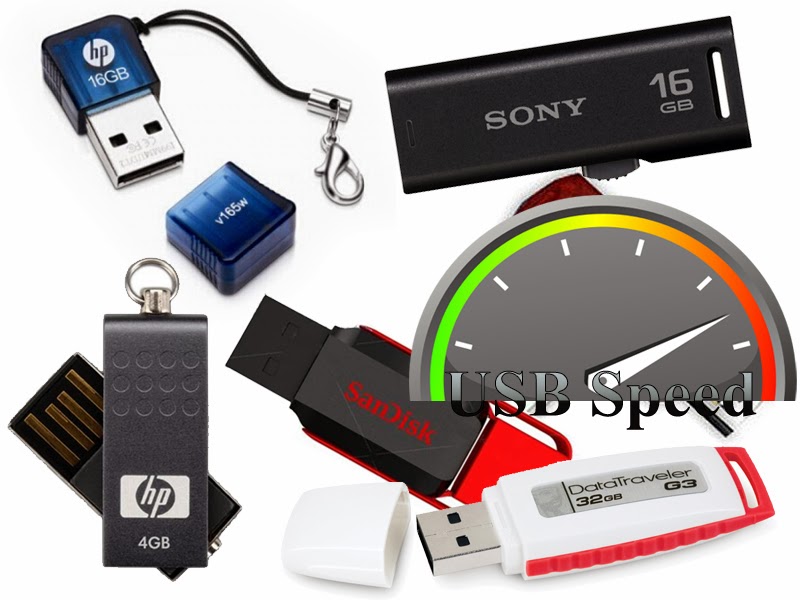
USB FLASH DRIVES ARE A GREAT WAY TO TRANSFER FILES BETWEEN COMPUTERS, IT HANDLES A LOT OF DATA COMPARED TO A CDROM, FLOPPY DISK OR ANY OTHER REMOVABLE MEDIA, IT ALSO A VERY HANDY TOOL TO TRAVEL BETWEEN COMPUTERS CARRYING DATA. ALTHOUGH THE SPEED OF DATA TRANSFER IS VERY IMPORTANT, YOU CAN GET AN USB FLASH DRIVE THAT PROVIDES ~300 KB/S DATA TRANSFER SPEED OR ALSO YOU CAN GET ONE THAT PROVIDES UP TO ~10 MB/S DATA TRANSFER SPEED. SO HERES AN ARTICLE ABOUT HOW YOU CAN SPEEDUP YOUR PENDRIVE DATA TRANSFER SPEED AND KNOW MORE ABOUT YOUR PEN DRIVE.
What is USB Data Transfer Speed?
USB Data Transfer speed refers to the amount of data carried through the usb in a second, the amount always is measured by KB, MB or GB for blazing fast usb. There are 3 types of USB ports, USB 1.0 (older and very slow), USB 2.0 (used almost on all computers) and USB 3.0 (the newer and fastest one, can reach 1GB per second)
Why the USB Transfer Speed Matters?
Why the USB Transfer Speed Matters?
When copying a file to your pendrive, that file has a size and the pendrive has a transfer speed, youll be waiting for that file to complete transferring because the file size is too big or the data transfer is too slow, heres 2 examples:
Example 1:
If the file is sized 2GB
And the Pendrive speed is 5MB per second (the average normal speed on almost all the USB flash drives)
Heres a small calculation about the duration of the transfer:
2 GB x 1024 = 2048 MB
2048 / 5 MB = 409,6 Seconds
Youll be waiting 6 Minutes and 49 Seconds for this Transfer
Example 2:
If the file is sized 2GB
And the Pendrive speed is 30MB per second (an improved speed)
Youll be waiting Only 1 Minute and 8 Seconds
A difference of 3 minutes or more can happen if your pendrive is so slow carrying files. Heres a smart trick to increase the speed of transfer thus decreasing the waiting time.
How to Speedup Pendrive Data Transfer
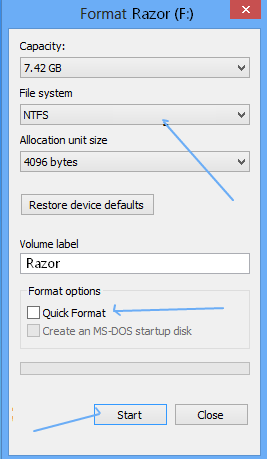
1) Go to the Pendrive and Right Click then Format...
2) Change the filesystem to NTFS as it supports larger data transfer
3) Uncheck Quick Format then press Start
4) Now again go to the Pendrive, Right Click -> Properties
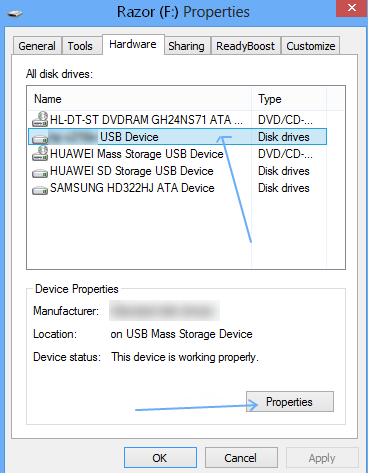
5) Go to Hardware tab, select the Pendrive from the hardware list then click Properties
6) Check the radio button Better Performance then click OK
enjoyee-----------???????