Showing posts with label transfer. Show all posts

Tuesday, April 4, 2017

How Wireless Power Transfer Works

How Wireless Power Transfer Works


how wireless power transfer worksIn this post we discuss regarding how wireless power transfer works or the transfer of electricity through air without using wires.

You might have already come across this technology and might have gone through many related theories on the Internet.
Although the Internet may be full of such articles explaining the concept with examples and videos, the reader mostly fails to understand the core principle governing the technology, and its future prospects.
In this article we’ll roughly try to get an idea regarding how a wireless electricity transfer happens or works or conduction takes place and why the idea is so difficult to implement over large distances.
The most common and classic example of wireless power transfer is our old radio and TV technology which works by sending electrical waves (RF) from one point to the other without cables, for the intended data transfer.
However the drawback behind this technology is that it is unable to transfer the waves with high current such that the transmitted power becomes meaningful and usable on the receiving side for driving a potential electrical load.
This problem becomes difficult since the resistance of air could be in the range of millions of mega Ohms and thus extremely difficult to cut through.
Another hassle that makes the long distance transfer even more difficult is the focusing feasibility of the power to the destination.
If the transmitted current is allowed to disperse over a wide angle, the destination receiver might not be able to receive the sent power, and could possibly acquire just a fraction of it, making the operation extremely inefficient.
However, transferring electricity over short distances without wires looks much easier and has been successfully implemented by many, simply because for short distances the above discussed constraints never become an issue.
For a short distance wireless power transfer, the air resistance encountered is much smaller, within a range of a few 1000 meg ohm (or even lesser depending on the proximity level), and the transfer becomes feasible rather efficiently with the incorporation of high current and high frequency.
In order to acquire an optimal distance-to-current efficiency, the frequency of transmission becomes the most important parameter in the operation.
Higher frequencies enable larger distances to be covered more effectively, and therefore this is one element that needs to be followed while devising a wireless power transfer apparatus.
Another parameter that helps the transfer easier is the voltage level, higher voltages allow involving lower current, and in keeping the device compact.
Now let’s try to grasp the concept through a simple circuit set up:
how wireless power transfer works
Parts List
R1 = 10 ohm
L1 = 9-0-9 turns, that is 18 turns with a center tap using a 30 SWG super enameled copper wire.
L2 = 18 turns using 30 SWG super enameled copper wire.
T1 = 2N2222
D1—-D4 = 1N4007
C1 = 100uF/25V
3V = 2 AAA 1.5V cells in series
The image above shows a straightforward wireless power transfer circuit consisting of the transmitter stage on the left and the receiver stage on the right side of the design.
Both the stages can be seen separated with a significant air gap for the intended shift of electricity.
The power transmitter stage looks like an oscillator circuit made through a feedback network circuit across an NPN transistor and an inductor.
Yes that’s right the transmitter indeed is an oscillator stage which works in a push-pull manner for inducing a pulsating high frequency current in the associated coil (L1).
The induced high frequency current develops a corresponding amount of electromagnetic waves around the coil.
Being at a high frequency this electromagnetic field is able to tear apart through the air gap around it and reach out to a distance that be permissible depending upon its current rating.
The receiver stage may be seen consisting of only a complimenting inductor L2 quite similar to L1, which has the sole role of accepting the transmitted electromagnetic waves and converting it back to a potential difference or electricity albeit at a lower power level due to the involved transmission losses through the air.
The electromagnetic waves generated from L1 is radiated all around, and L2 being somewhere in the line is hit by these EM waves. When this happens, the electrons inside the L2 wires are forced to oscillate at the same rate as the EM waves, which finally results in an induced electricity across L2 too.
The electricity is rectified and filtered appropriately by the connected bridge rectifier and C1 constituting an equivalent DC output across the shown output terminals.
Actually, if we carefully see the working principle of wireless power transfer we find it’s nothing new but our age old transformer technology that we ordinarily use in our power supplies, SMPS units etc.
The only difference being the absence of the core which we normally find in our regular power supply transformers. The core helps to maximize (concentrate) the power transfer process, and introduce minimum losses which in turn increases the efficiency to a great extent
The core also allows the use of relatively lower frequencies for the process, to be precise around 50 to 100 Hz for iron core transformers while within 100kHz for ferrite core transformers.
However in our proposed article regarding how wireless power transfer functions, since the two sections need to be entirely aloof from each other, the use of a core becomes out of question, and the system is compelled to work without the comfort of an assisting core.
Without a core it becomes essential that a relatively higher frequency and also higher current is employed so that the transfer is able to initiate, which may be directly dependent on the distance between the transmitting and the receiving stages.
To Summarize, from the above discussion we can assume that to implement an optimal power transfer through air, we need to have the following parameters included in the design:
A correctly matched coil ratio with respect to the intended voltage induction.
A high frequency in the order of 200kHz to 500kHz or higher for the transmitter coil.
And a high current for the transmitter coil, depending on how much distance the radiated electromagnetic waves is required to be transferred.

Available link for download

Read more »

Thursday, February 2, 2017

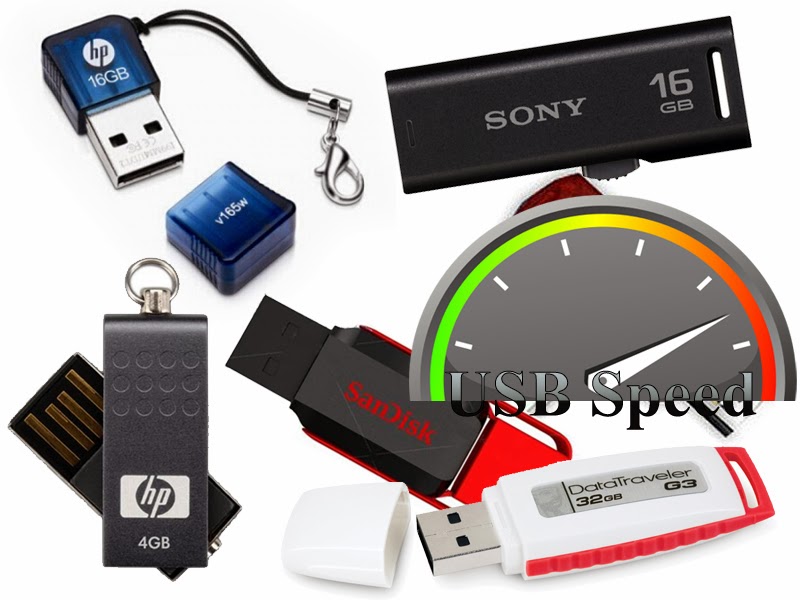
How to Speedup Pen drive File Transfer

How to Speedup Pen drive File Transfer


USB FLASH DRIVES ARE A GREAT WAY TO TRANSFER FILES BETWEEN COMPUTERS, IT HANDLES A LOT OF DATA COMPARED TO A CDROM, FLOPPY DISK OR ANY OTHER REMOVABLE MEDIA, IT ALSO A VERY HANDY TOOL TO TRAVEL BETWEEN COMPUTERS CARRYING DATA. ALTHOUGH THE SPEED OF DATA TRANSFER IS VERY IMPORTANT, YOU CAN GET AN USB FLASH DRIVE THAT PROVIDES ~300 KB/S DATA TRANSFER SPEED OR ALSO YOU CAN GET ONE THAT PROVIDES UP TO ~10 MB/S DATA TRANSFER SPEED. SO HERES AN ARTICLE ABOUT HOW YOU CAN SPEEDUP YOUR PENDRIVE DATA TRANSFER SPEED AND KNOW MORE ABOUT YOUR PEN DRIVE.


What is USB Data Transfer Speed?


USB Data Transfer speed refers to the amount of data carried through the usb in a second, the amount always is measured by KB, MB or GB for blazing fast usb. There are 3 types of USB ports, USB 1.0 (older and very slow), USB 2.0 (used almost on all computers) and USB 3.0 (the newer and fastest one, can reach 1GB per second)

Why the USB Transfer Speed Matters?
When copying a file to your pendrive, that file has a size and the pendrive has a transfer speed, youll be waiting for that file to complete transferring because the file size is too big or the data transfer is too slow, heres 2 examples:

Example 1: 
If the file is sized 2GB
And the Pendrive speed is 5MB per second (the average normal speed on almost all the USB flash drives)
Heres a small calculation about the duration of the transfer:
2 GB x 1024 = 2048 MB
2048 / 5 MB = 409,6 Seconds
Youll be waiting 6 Minutes and 49 Seconds for this Transfer


Example 2: 
If the file is sized 2GB
And the Pendrive speed is 30MB per second (an improved speed)
Youll be waiting Only 1 Minute and 8 Seconds


A difference of 3 minutes or more can happen if your pendrive is so slow carrying files. Heres a smart trick to increase the speed of transfer thus decreasing the waiting time.


How to Speedup Pendrive Data Transfer

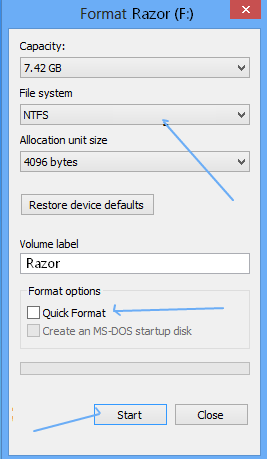
1) Go to the Pendrive and Right Click then Format... 

2) Change the filesystem to NTFS as it supports larger data transfer

3) Uncheck Quick Format then press Start
 

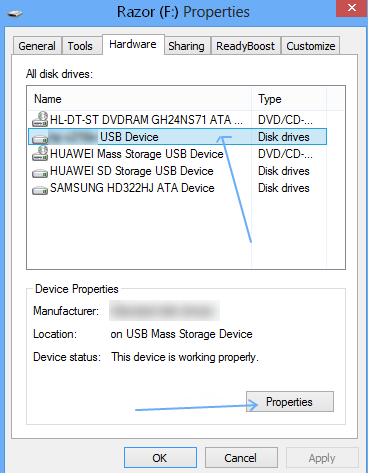
4) Now again go to the Pendrive, Right Click -> Properties 

5) Go to Hardware tab, select the Pendrive from the hardware list then click Properties


6) Check the radio button Better Performance then click OK

enjoyee-----------???????

Available link for download

Read more »

Tuesday, January 24, 2017

How to Transfer Credit with Mtn Using Mtn Share and Sell

How to Transfer Credit with Mtn Using Mtn Share and Sell


Many MTN Subscribers still dont know how to transfer airtime from one MTN SIM to another , that is why I have taken time to write down the steps you need to take in transferring credit using MTN share and sell.

Here is how it works:

If it is your first time of using MTN Share and Sell, the first thing you need to do is to change the default pin (just like an ATM card you have to change the default PIN first before you can use it).

To change MTN Share and Sell Default Pin text oldpin (space) followed my your new pin and space repeat your new pin. For example I want to change the default PIN now to 9200. I will text 0000 9200 9200 to 777.


0000 - this is the default PIN for MTN share and sell
9200 - this is my new PIN I want to use for MTN Share and sell.

Now after texting the said, you will get a confirmation message welcoming you to MTN Share and Sell and that your PIN has been successfully change.

So lets move on to how to transfer credit with MTN Share and Sell, having change your PIN.

Now that you have change your PIN you need to try and memorize your new PIN and make sure you have it on your finger tips.

To transfer MTN airtime via SMS, text: Transfer (space) recipient phone number (space) amount in Nigeria followed by your PIN. Example Transfer 07064538704 100 9200. This means am transferring 100naira to the number 07064538704 using my PIN 9200.

After you might have send this, you will receive an SMS from MTN Share and Sell requesting you to authenticate the transaction. To authenticate the transaction simply text YES to 777, and in few minutes you will receive a text message from MTN Share and Sell confirming the transfer was successfully.


MTN Share and Sell is Free on the MTN Nigeria network and it is only limited to MTN Subscribers only.


Please note that the minimum value or amount you can transfer at a time is 50naira and the maximum amount is 6,000.


Available link for download

Read more »

Friday, December 2, 2016

IDM Error Cannot Transfer File di Windows 8

IDM Error Cannot Transfer File di Windows 8


salam,
Entah apa yang salah atau memang tidak support, saya tidak berhasil mendownload file melalui Internet Download Manager (IDM). Padahal saya sudah melakukan Instalasi versi IDM dan browser yang up to date. namun setiap akan melakukan download selalu pesan error yang muncul. enteh IDM sudah tidak kompatible dengan Windows 8 saya juga kurang mengerti. akhirnya saya berfikir untuk menggunakan Download Manager Alternatif.
Setelah saya coba akhirnya saya memutuskan menggunakan Free Download Manager. Interface yang similiar dengan IDM membuat saya tidak terlalu kesulitan menggunakan Download Manager ini. Selain itu software satu ini memiliki keunggulan ketimbang IDM yaitu
- Proses download yang tidak mengganggu bandwith lain
- Support Download torrent
- Support Download Flash Content
- Memiliki Preview


dan sejauh ini saya tidak menemukan error ketika melakukan download file dari internet.
semoga bermanfaat

Download

Available link for download

Read more »

Friday, November 25, 2016

HP Color LaserJet CP1215 Intermediate Transfer Belt Assembly ITB

HP Color LaserJet CP1215 Intermediate Transfer Belt Assembly ITB


Hasil print tidak bagus bagian tepi. Setelah di lihat kedalam ternyata bagia film robek bahasa inggrinya Intermediate Transfer Belt Assembly (ITB), wow...gimana kok bisa terjadi seperti ini... aduh tanpa di jawab aku coba dengan mengkanibalnya emmm  hasil langsung oke, permasalahannya hanya gara2 film(ITB) nya robek. Sekian
ITB

Available link for download

Read more »