Showing posts with label laserjet. Show all posts
Showing posts with label laserjet. Show all posts
Saturday, March 25, 2017
HP LaserJet Error Messages F M
HP LaserJet Error Messages F M
Message on printer display | What it means | What to do | ||||||||||||||||||||||||||||||||||||||||||||||||||||||||||||||||||||
FILE SYSTEM IS FULL | The disk file system is full. | 1. Delete all unnecessary files from the EIO disk and then try again. Use HP Resource Manager to download or delete files and fonts. (See the software help for more information.) 2. Advise the customer to increase the permanent storage (use a larger EIO disk or add a RAM DIMM). | ||||||||||||||||||||||||||||||||||||||||||||||||||||||||||||||||||||
FLASH DEVICE FAILURE | The flash DIMM had a critical or fatal failure. | 1. Reseat the flash DIMM and ensure it is locked into place. 2. Remove the flash DIMM and replace it with a new one. 3. The formatter could also be bad; replace formatter if needed. | ||||||||||||||||||||||||||||||||||||||||||||||||||||||||||||||||||||
FLASH FILE OPERATION FAILED | The requested operation could not be performed (for example, attempting to download a file to a nonexistent directory). | 1. Check the file name and the directory name. 2. Reseat the flash DIMM. 3. Retry the operation. | ||||||||||||||||||||||||||||||||||||||||||||||||||||||||||||||||||||
FLASH FILE SYSTEM IS FULL | The flash file system is full. | Delete unnecessary files from the flash DIMM and try again. Use HP Resource Manager to download or delete files and fonts. (See the software help for more information.) | ||||||||||||||||||||||||||||||||||||||||||||||||||||||||||||||||||||
FLASH IS WRITE PROTECTED | The flash DIMM is protected and no new files can be written to it. | Disable the write protection through HP Resource Manager. | ||||||||||||||||||||||||||||||||||||||||||||||||||||||||||||||||||||
HP TONER DETECTED alternates with PRESS GO TO CONTINUE | The printer has detected that the toner cartridge is not a genuine HP toner cartridge because it does not see or recognize the toner cartridge’s identification (model, manufacturing date, and serial number). | 1. Make sure the toner cartridge is a genuine HP toner cartridge. A non-HP toner cartridge will produce this error. Any printer repair required as a result of using non-HP toner is not covered under the printer warranty. 2. If the HP toner cartridge is new, the Elabel (cartridge memory) is missing or has been tampered with. 3. If the HP toner cartridge is used, the printer will not recognize the cartridge until 20 pages have been printed. After 20 pages have been printed, the error message disappears. 4. If the HP toner cartridge is used, and the error message remains after 20 pages have been printed, the cartridge has previously run out of toner. Replace the toner cartridge. | ||||||||||||||||||||||||||||||||||||||||||||||||||||||||||||||||||||
INPUT DEVICE CONDITION [XX.YY] | An input paper-handling device has a condition that needs attention before printing can resume. 1st X = Device number in chain 2nd X= Device type (three types): 1 = Input 2 = Output 3 = Stapler/stacker unit YY = Device specific error | 1. Turn the printer off. 2. Disconnect the cable to the input paper handling devices and then reconnect it. 3. Ensure the device is properly connected and any doors or paper guides are properly closed. 4. Turn the printer on. 5. See the documentation that came with the paper-handling device for assistance. | ||||||||||||||||||||||||||||||||||||||||||||||||||||||||||||||||||||
INSTALL DUPLEXER | The printer is unable to print the current job because the duplexer is not installed or not inserted correctly. | 1. Turn the printer power off. Install or reinsert the duplexer and ensure it is fully seated. 2. Ensure the right-angle power cord is used for the printer. | ||||||||||||||||||||||||||||||||||||||||||||||||||||||||||||||||||||
INSTALL TONER CARTRIDGE | The toner cartridge has been removed and must be reinstalled for printing to continue. | Reinstall the toner cartridge and ensure it is fully seated. The high voltage power supply might also cause this error. | ||||||||||||||||||||||||||||||||||||||||||||||||||||||||||||||||||||
INSTALL TRAY [X] | The printer is unable to print the current job because the specified tray [X] is open or not inserted correctly | 1. Reinsert the specified tray. 2. Check for damaged tabs on the right side of the tray. 3. Check for damaged tray sensor switches in the printer. 4. Replace the PCA controller in the feeder | ||||||||||||||||||||||||||||||||||||||||||||||||||||||||||||||||||||
LOADING PROGRAM [NUMBER] alternates with DO NOT POWER OFF | Programs and fonts can be stored on the printer’s file system. At startup time, these entities are loaded into RAM. (These entities can take a long time to load into RAM depending on the size and number of entities being loaded.) The | Available link for download
Read more »

Thursday, March 2, 2017HP LASERJET 5200 ERROR 52 00 PAPER JAMMEDHP LASERJET 5200 ERROR 52 00 PAPER JAMMEDAnalisa sebelum di bongkar, printer ready begitu saya test print manual kertas narik sampai di tengah kertas berhenti bersamaan di layar error 52,00 nah setelah priksa sana sini saya temukan permasalahannya pada bagian scanner unitnya, lihat gambar di bawah ini. ternyata bagian scanner unitnya bersarang semut semut nakal dan beranak cucu di dalam. bersihkan semua dan pasang kembali ...wow,...sempurna..........sekian"""""       Available link for download
Wednesday, March 1, 2017Hp Laserjet P1005 P1006 Printers Free Drivers DownloadHp Laserjet P1005 P1006 Printers Free Drivers DownloadHp Laserjet P1005 P1006 Printers Free Drivers DownloadHp Laserjet P1005 P1006 Printers Free Drivers Download- The laser printer active users in Indonesia are already familiar with both of these series printers, HP Laser Jet P1005 and P1006. Both of these laser printers had long circulated in Indonesia and is commonly used among professional companies and government agencies, although this product is now discontinue. But sometimes we still can find the printer is in new condition in some places. The second price is quite affordable printers including laser printers in the class, which is relatively small in size, and a fairly stable performance makes it to be one monochrome laser printers are popular in Indonesia. Hp Laserjet P1005 P1006 Printers Free Drivers Download |


 |
| Scanner unit yang sebelumnya saya duga bermasalah saya bersihin |

 |
| Contoh hasil print setelah diservice bagian flat yang melengkun |
Available link for download
Friday, February 17, 2017
HP Laserjet 1536DNF MFP Driver Download
HP Laserjet 1536DNF MFP Driver Download
HP Laserjet 1536DNF MFP Driver Download

HP Laserjet 1536DNF MFP Driver Download - The HP LaserJet skilled 1536dnf all-in-One Printer, Copier, Scanner, Fax & designed with the body merely to beautify the ruag ataua workplace table home business. Printer professional M1536dnf provides the documents or photos for lovely results and skilled quality with a thick, clear text and sharp pictures, and handles some media size and sort of priority with around 15-sheet, and 255-sheet paper receptacle. intrinsical wired network thus youll fancy simply share printing, scanning, repeating and Faxing resources all-in-one, Fax, directly from the computer and Fax access management with PIN in has been such, repeating on each side of the ID card to a single-sided document, victimization original HP Toner in printer HP to largest results, once print is usually satisfactory results and when printing.
HP Laserjet 1536DNF MFP Driver Download
Do a lot of With a quick MFP And Two-Sided Printing
- Stay productive Print at up to twenty six ppm and find a primary page get into as quick as eight.5 seconds.
- Share printing resources with associate Ethernet-connected MFP.
- Tackle multiple-page documents and 2 sided prints with the 35 page automatic documents feeder.
- Fax on to and from a computer, and management fax access with appointed PINs.
HP Laserjet 1536DNF MFP Driver Download
Create High-Quality Documents In Multiple Sizes
- Print high-quality documents with daring text and sharp pictures, victimization Original HP LaserJet print cartridges.
- Achieve improved print quality with HP FastRes 1200.
- Handle multiple media sizes and kinds with a 10-sheet priority receptacle and therefore the 250-sheet paper receptacle. HP LaserJet recommends ColorLok papers for best printing results.
Print From Any Device four & Use Intuitive options
- Stay productive on the go, victimization HP ePrint if youll e-mail it from a mobile device, youll print it.
- Simplify printing tasks with associate intuitive board and LCD. turn out one-sided copies of two-sided IDs.
- Easily realize and buy cartridge replacements with HP SureSupply, three and install them in a very snap.
- Use embedded HP tools for straightforward MFP configuration, operation and maintenance.
HP Laserjet 1536DNF MFP Driver Download Supports Os
Windows Vista 32 Bit -> Windows Vista 64-Bit
Windows XP 32 Bit -> Windows XP 64-Bit
Windows 8 32 Bit -> Windows 8 64-Bit
Windows 8.1 32 Bit -> Windows 8.1 64-Bit
Windows 7 32 Bit -> Windows 7 64-Bit
Mac Os
Linux
HP Laserjet 1536DNF MFP Driver Download
| Driver | Link |
| Printer Driver | Download |
| Scanner Driver | Download |
Available link for download
Sunday, January 15, 2017
HP LaserJet Error Messages A E
HP LaserJet Error Messages A E
Message on printer display | What it means | What to do | ||||||||||||||||||||||
ACCESS DENIED MENUS LOCKED | The control panel function you are trying to use has been locked by the network administrator to prevent unauthorized access. | 1. Ask the network administrator to unlock the function. 2. Perform a cold reset. This will reset the printer to factory defaults. If a JetDirect network card is installed it will also reset the IP address and other settings so you might want to remove the JetDirect before performing the cold reset. | ||||||||||||||||||||||
BAD DUPLEXER CONNECTION | The duplexer is not correctly installed. | 1. Some printers need a right-angle power cord for a duplexer to be installed correctly. Make sure right-angle cord is installed, if needed. 2. Turn the printer off. 3. Remove and reinstall the duplexer. 4. Turn the printer off and back on. 5. If the message persists, make sure the duplexer is connected and the connector is not damaged. 6. Replace the duplexer. | ||||||||||||||||||||||
CHECK INPUT DEVICE alternates with PAPER PATH OPEN PLEASE CLOSE IT | The optional input tray cannot feed print media to the printer because a door or paper guide is open | 1. Check the doors and paper guides and close any that are open. 2. If doors and trays are closed, check tabs and sensor levers in the tray for proper operation. Replace any defective tabs or sensors. 3. Replace the PCA controller in the feeder. For 5si, 8000, 8100 series make sure C-link cable is correctly hooked up. Also on the 5si check the paper accessory PCA. | ||||||||||||||||||||||
CHECK OUTPUT DEVICE alternates with CLOSE OUTPUT DELIVERY PATH | The optional output device is not properly connected to the printer. | 1. Ensure the optional output device is fully seated and properly installed. 2. Check any doors on the output device and verify they are closed. For 5si, 8000, 8100 series make sure C-link cable is correctly hooked up. | ||||||||||||||||||||||
DISK DEVICE FAILURE | The EIO disk had a critical failure or fatal error. | 1. Reseat the EIO disk. 2. Remove the EIO disk and replace it with a new one. 3. A bad formatter assembly could also cause this error, replace if needed. | ||||||||||||||||||||||
DISK FILE OPERATION FAILED | Requested operation could not be performed (for example, attempting to download a file to a nonexistent directory). | 1. Check the file name and the directory name. 2. Reseat the EIO disk. 3. Retry the operation. | ||||||||||||||||||||||
DISK IS WRITE PROTECTED | The EIO disk is protected, and no new files can be written to it. | Disable the write protection through HP Resource Manager. | ||||||||||||||||||||||
EIO DISK [x] NOT FUNCTIONAL | EIO disk is not working correctly | 1. Reseat the EIO disk in slot [X]. 2. Remove and replace the EIO disk in slot [X]. | ||||||||||||||||||||||
ENV FEEDER LOAD [TYPE] [SIZE] | A job has been sent to the envelope feeder and the feeder is empty, the wrong size is loaded in the feeder, or the type and size are set incorrectly on the control panel. | 1. Load the requested envelope type and size into the envelope feeder. 2. Make sure the envelope size and type are set correctly from the paper-handling menu in the printer control panel. 3. Press GO if the desired envelope is already loaded in the feeder. 4. Press -VALUE+ to scroll through other available types and sizes. 5. Press SELECT to accept the alternate type or size. | ||||||||||||||||||||||
ENVELOPE FEEDER SIZE = [xxxxx] | The printer is asking what size envelopes have been loaded in the envelope feeder. | In response, you can take either of the following actions: 1. Press SELECT to accept the current envelope size. 2. Press -VALUE+ to change the size and then press SELECT to accept the new size. If you do not press any buttons, the message disappears in about one minute. Note Changing the size here changes the default for the envelopefeeder size in the paper-handling menu. | ||||||||||||||||||||||
ENVELOPE FEEDER TYPE = [xxxxx] | The printer has received a job under the following conditions: The envelope type the job requested is not available in the printer. Envelopes have been placed in the envelope feeder (thus triggering the paper sensor). | Available link for download
Read more »
Monday, December 26, 2016HP Laserjet Pro M225DW Driver DownloadHP Laserjet Pro M225DW Driver DownloadHP Laserjet Pro M225DW Driver Download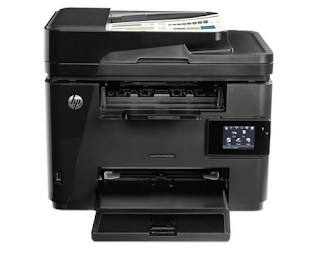 HP Laserjet Pro M225DW Driver Download - LaserJet professional MFP M225dw actually appearance the half, housed in an exceedingly sensible all-black casing that follows traditional MFP conventions, which, during this case, means that a 600dpi monochrome optical device engine within the base of the unit and a 1200dpi flatbed scanner mounted higher than. An automatic 35-sheet document feeder is additionally constitutional, sitting on the highest of the stack to assist alter each scanning and repeating. However, its value noting that the scanner solely has one scan head that makes double-sided scanning/copying a removed from simple method that needs further manual intervention. A single 250-sheet receptacle keeps the engine fed with paper and there is a helpful bypass slot higher than to address headed paper and different non-standard media while not having to manipulate with the most paper receptacle. A another receptacle would be nice however that is a rare possibility during this bracket and, for alittle business, the 250 sheet capability (half a ream) ought to be enough. Moreover, not like the H.P. OfficeJet professional 6830 that targets an equivalent sector, the M225dw encompasses a separate catch receptacle close to the highest for finished documents which does not get within the method of victimization either the paper receptacle or bypass slot. HP Laserjet Pro M225DW Driver Download The power offer is constitutional thus no AC adapter is required and, moreover as a USB connective for direct computer attachment, there is a Gigabit local area network port for LAN sharing and 802.11n LAN (hence the "dw" at the tip of the model number). Wireless makes it a really simple device to put in, we tend to had it unboxed and dealing in but 5 minutes. and it supports direct wireless printing from notebook and tablet and smartphones while not the requirement for a LAN network. Together with a socket for the phone lead must you would like to require advantage of the constitutional fax capabilities. Not that a lot of businesses do recently, with fax speedily turning into one thing of AN anachronism on this kind of product. Duty cycle for the MFP is eight,000 pages per month that is over adequate for a tool of this kind. The optical device engine is equally compatible at 25ppm, or fifteen sides per minute if you select to require advantage of the in-built duplexer and print double-sided. like all printer/copiers, however, actual output is probably going to be lots slower than this, though with a 600MHz processor and 256MB of memory its miles from slow. HP Laserjet Pro M225DW Driver Download We tested employing a wireless network association and there was an understandable lag once causing a document to print, the primary page taking around ten seconds to seem. Later pages, however, came out way more quickly. A typical 9-page PDF, as an example, written in thirty seconds overall, effectively giving 18ppm with different applications managing to induce even nearer to the engine speed. The scanner, meanwhile, is rated at simply 14ppm for mono (6ppm for colour) with one copy of a monochrome original taking around thirteen seconds to finish, equalisation to only below 5ppm for single-sided repeating. color originals were slower to repeat however not vastly thus and if you are going to try and do lots of color repeating this device is not essentially the correct tool for the duty anyway. HP Laserjet Pro M225DW Driver Download Supports Os Windows Vista 32 Bit -> Windows Vista 64-Bit Windows XP 32 Bit -> Windows XP 64-Bit Windows 8 32 Bit -> Windows 8 64-Bit Windows 8.1 32 Bit -> Windows 8.1 64-Bit Windows 7 32 Bit -> Windows 7 64-Bit Mac Os Linux How to Install Printer Drivers
How To Uninstall Printer Driver
HP Laserjet Pro M225DW Driver DownloadHP Laserjet Pro M225DW Driver For Windows
HP Laserjet Pro M225DW Driver For Mac Os
HP Laserjet Pro M225DW Driver For Linux
Available link for download
Friday, November 25, 2016HP Color LaserJet CP1215 Intermediate Transfer Belt Assembly ITBHP Color LaserJet CP1215 Intermediate Transfer Belt Assembly ITBHasil print tidak bagus bagian tepi. Setelah di lihat kedalam ternyata bagia film robek bahasa inggrinya Intermediate Transfer Belt Assembly (ITB), wow...gimana kok bisa terjadi seperti ini... aduh tanpa di jawab aku coba dengan mengkanibalnya emmm hasil langsung oke, permasalahannya hanya gara2 film(ITB) nya robek. Sekian  
  Available link for download
Subscribe to:
Posts (Atom)
|
