Showing posts with label after. Show all posts
Showing posts with label after. Show all posts
Wednesday, April 26, 2017
Its Possible To Get Pregnant After 50 But That Doesnt Mean Women Should
Its Possible To Get Pregnant After 50 But That Doesnt Mean Women Should
Its Possible To Get Pregnant After 50, But That Doesnt Mean Women Should
 |
| © Photo courtesy of Shutterstock Science has erased the age limit for when a woman can become pregnant. But from a moral standpoint, there may be a time in our lives when becoming pregnant simply… |
How old is too old to give birth? The answer to this question would have been obvious 30 years ago, but recent advancements in fertility treatments mean that in 2015, a woman’s biological clock can be permanently put on hold. Thanks to science, a 55- or even 65-year-old woman can do what was once unthinkable: become pregnant and give birth to a healthy child. However, just because a woman of this age can physically become pregnant, is the decision to do so ethical?
A Breif History Of Pregnancy Over 50
The oldest mother in history is Rajo Devi Lohan, an Indian woman who gave birth at age 70 thanks to the help of fertility treatments. Lohan’s case is not isolated. In 2006, a 62-year-old great-grandmother in California gave birth to her 12th child with the help of in-vitro fertilization (IVF), and later that same year, a 66-year-old Spanish woman underwent IVF at a Los Angeles fertility clinic and gave birth some months later.
In 2010, a survey from The Pew Research Center found that although overall birthrates peaked among women in their late 20s, the birth rates for women aged 35 to 39 had increased by 47 percent and the birthrates for women aged 40 to 44 had increased by 80 percent. In England, around three children every week are born to mothers in their 50s, according to the Daily Mail.
Physical Limits In Older Women
At 20 weeks of pregnancy, a female fetus has a fully developed reproductive system, complete with her entire lifes worth of eggs — six to seven million to be exact. But by the time that woman is 30, she will have lost nearly 90 percent of her eggs, and at age 40, only around three percent of them are left. Most women are no longer able to become naturally pregnant in their mid-40s. However, while a woman’s eggs have an expiration date, the uterus, or where a fertilized egg will attach and grow, does not.
“The bottom line is that the uterus can function just about until the death of the woman,” Dr. David Adamson, a fertility expert for Fertility Physicians of Northern California, told Medical Daily.
While it seems there are no longer biological constraints to pregnancy past menopause, the risk of dangerous complications associated with carrying a child and giving birth significantly increase as a woman ages. Generally speaking, any woman who reaches age 35 and becomes pregnant is considered an older mother. This puts her at an increased risk for multiple pregnancies, gestational diabetes; high blood pressure during during pregnancy; premature birth; having a baby of low birth weight; needing a C-section; having a child with chromosome abnormalities; and experiencing a miscarriage. Pregnancy is also physically hard on the older body, and the weight of carrying a child can be more stressful for women over 50 than it would be for younger women.
These Women Do Really Pretty Well
With all that said, humans are healthier than they have ever been in history, and therefore living longer than ever before. A study published in The Lancetlast year showed that in 2014, human life expectancy around the globe hit an all-time high of 71.5 years. This is largely thanks to modern medicine, which is constantly improving — and its also making pregnancy less dangerous each year. How so? A 2012 study looking at 101 pregnancies in women over 50 found that, if screened and cared for, “these women do really pretty well,“ senior author of the study Dr. Mark Sauer told Live Science.
For this reason, Dr. Eric Flisser, a Long Island medical director from Reproductive Medical Associates of New York, told Medical Daily that age is no longer the biggest indicator of whether or not a woman should receive IVF treatment. Also, because the eggs implanted into older women are usually harvested from younger women, there is no longer a risk of chromosomal abnormalities generally associated with older pregnancies.
.jpg) |
| © Provided by Medical Daily newbornbaby |
There is more to being a parent than just giving birth. Photo courtesy of Shutterstock
“You can argue that when people say, ‘This is too old, the risks are too high," it "is counterbalanced by younger patients who also have risks,” explained Flisser. “If a woman is capable [of becoming pregnant], on what grounds do you have to deny her services?”
While rising rates of maternal mortality in the U.S. is a great cause for concern, Adamson explained that only a small fraction of this increase is due to the risks of older pregnancies. “There’s no question that maternal mortality is going up, but telling older women not to have babies is not going to solve the maternal mortality in this country.”
Is IVF In Older Women Ethical?
Fertility doctors know that with the right amount of monitoring, a woman can safely carry out a pregnancy well into her 50s or 60s. But is it ethical for a woman to do this? There is no law in the U.S. limiting the age for a woman to receive IVF; individual clinics make that decision.
Some U.S. fertility clinics use a woman’s menopause as a guideline for when fertility treatment should no longer be conducted. Using this as a basis, Dr. Adamson said that if he were to give fertility treatment to a woman over the age of 50, there would need to be "compelling reasons to proceed" with the pregnancy, and that they would need to "outweigh the significant medical risks associated with pregnancy at this age." Once a woman reaches her mid-50s, "its difficult to envisage a situation in which the social benefits of pregnancy and parenthood outweigh the major medical risks."
Flisser had a bit of a different perspective on the issue, saying that “menopause is no longer a limit on a woman’s fertility and it needs to be dissociated from it. In terms of determining the cut, it has to be passed on more than just age.”
Although pregnancy at an older age may not affect the health of the mother, there are definitely moral complications that may come from giving birth at an older age, with parental lifespan being the most obvious concern. If you have a child at 55, there is a high chance that you may not live to see them graduate from college.
The Ethics Committee of the American Society for Reproductive Medicine maintains the wellbeing of a child as a top priority in its stance on IVF in older women. It states that a doctor has the right to refuse a couple treatment “when there are reasonable grounds for thinking the patient will not provide adequate child-rearing to offspring.”
The Society fails, however, to mention how age might affect the ability to raise children. And unfortunately, because there are no universal laws on this, it means clinics can push the age of reproduction to the extreme. As Adamson puts it, “if you don’t do it, they will find someone who would.”
There’s More To Parenting Than Pregnancy
On the Today Show, Dr. Nancy Snyderman, medical correspondent for NBC News, gave an interesting perspective on the issue when she asked, “Do you want to parent, or do you want to pop a baby out through the birth canal?” Although Adamson explained that, for some couples, the need to become parents is so great that being told of their infertility is like hearing a cancer diagnosis, a couple doesnt need to get pregnant to have a baby.
U.S. adoption agencies cap the age for adoptive parents at 50, but they are extremely flexible with this rule when it comes to adopting older children. For women who still feel the need to become mothers far past their natural fertility, this may prove to be not only the most healthy option but also the most ethical.
source
Its Possible To Get Pregnant After 50, But That Doesnt Mean Women ShouldAvailable link for download

Monday, December 5, 2016
How to Stop Reboots After Automatic Updates
How to Stop Reboots After Automatic Updates
You step away from your computer for a little while, and when you come back, your windows and your work are gone. Why? Because Windows downloaded some updates and then took it upon itself to reboot without asking you for permission to do so. If you’ve been plagued by the same problem, here’s what you need to do:
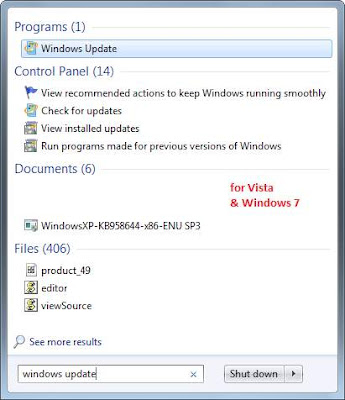
1. In Vista or windows7, click Start, type Windows Update, and click Enter. In XP, open the
control Panel and select Automatic Update from the menu of options.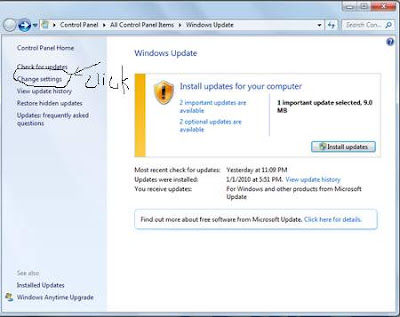 2. In Vista or windows7, click the Change Settings option at left. In XP, you can simply skip to step 3.
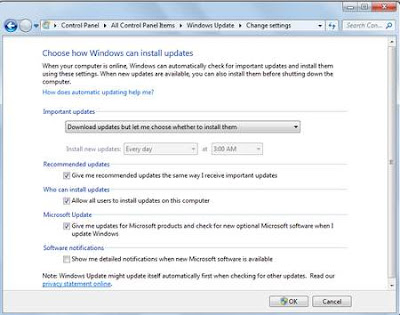 3. Change the setting to Download updates but let me choose whether to install them (in Vista) or Download updates for me, but let me choose when to install them (in XP).
Install updates without rebooting, constrain Windows Media Center’s drive space to a limit you
control Panel and select Automatic Update from the menu of options.
2. In Vista or windows7, click the Change Settings option at left. In XP, you can simply skip to step 3.3. Change the setting to Download updates but let me choose whether to install them (in Vista) or Download updates for me, but let me choose when to install them (in XP).Install updates without rebooting, constrain Windows Media Center’s drive space to a limit you
prefer, and force apps to run full-screen.
1. Start Windows Media Center.
2. Scroll down to Tasks, and then over to Settings, and click that option (or press).
3. Choose Recorder, and then Recorder Storage. (These options will appear only if you have a TV tuner installed and con? gured.)
4. Use the minus arrow located next to the redundantly named
4. Click OK. That’s it. Windows may still nag you about installing updates, but at least it won’t reboot without your permission.
1. Start Windows Media Center.
2. Scroll down to Tasks, and then over to Settings, and click that option (or press
3. Choose Recorder, and then Recorder Storage. (These options will appear only if you have a TV tuner installed and con? gured.)
4. Use the minus arrow located next to the redundantly named
4. Click OK. That’s it. Windows may still nag you about installing updates, but at least it won’t reboot without your permission.
Available link for download
Saturday, October 15, 2016
How To Upgrade to Gingerbread After Rooting and Removing Crapware From Your Droid X
How To Upgrade to Gingerbread After Rooting and Removing Crapware From Your Droid X
About 6 months ago I set out on a quest to root my Droid X (running FroYo) in order to remove/disable unwanted apps like CityID, BlockBuster, VZ Navigator, etc. While that was very successful, it did impede my ability to update to the much desired Gingerbread. While I consider myself smart and quite educated in the ways of technology (Ive made a decent living in the IT field for 20 years) I have really struggled to figure this out & its frustrated me greatly. There are a number of forums which discuss what to do and how to do it, but they almost always throw out terms which the lay person (with respect to Android OS in particular) wont understand or instructions that are written in short hand. While this may be fine for those "in the know," its not fine for the rest of us. So after pulling my hair out several evenings and weekends recently and reading a ton of stuff, I believed I finally stitched it all together enough to have upgraded my rooted Droid X to Gingerbread - but wait, there was a problem.....
Ill address that problem later (perhaps even in another post), but suffice it to say that although my Droid X reported it was on the latest and greatest Android OS, Gingerbread (AKA 4.5.596) it would often tell me there was an update available, and display the message, "Info. Download of update failed." This has finally gotten to me and Im in the process of correcting it, writing this as I progress with correcting this.
Here are the basic steps, then Ill expound on each.
- Backup data (and apps)
- SBF back to stock FroYo
- Verizon OTA update to Gingerbread
- Restore data (and apps)
Important note: this will leave you with the stock version of Gingerbread from Verizon/Motorola which includes the undesired built-in apps like CityID, BlockBuster, VZ Navigator, etc. that I worked so hard to remove previously; and as of this writing there is no way to gain root access of this version of Gingerbread (although you could always install a rooted SBF of Gingerbread....). On the bright side, at least youll be running Gingerbread on your Droid X.....
NOTE: There are a few gotchas and things to watch out for, so please read and follow these instructions carefully. For example at various points your phone may not start or the battery wont charge, but these things are addressed in the instructions.
NOTE: There are a few gotchas and things to watch out for, so please read and follow these instructions carefully. For example at various points your phone may not start or the battery wont charge, but these things are addressed in the instructions.
Step 1 - backup your data and apps
Ever since rooting my Droid Ive been using Titanium Backup Pro to backup my stuff, and its been great. However, in my attempts to upgrade to Gingerbread, which was somewhat successful except that I lost root so I wasnt able to use Titanium Backup to do a current backup as it requires root.... If you use TB and still have root access use that to backup everything you desire and skip to step 2, otherwise keep reading.
Since I couldnt use TB after losing root I got a copy of MyBackup and backed up everything, particularly the data on my phone.
NOTE: make sure you do a backup and/or be prepared to lose all your data (SMS, call logs, etc.) as one of the following steps requires wiping your phone.
Step 2 - SBF back to stock FroYo
First, WTF is SBF? The .SBF file basically consists of the original software platform that your phone was released with. It doesn’t seem like anyone truly understand what SBF stands for...
Download and install Morotolas RSD Lite - as of this post the latest version is 4.9, which is the version I used for these instructions. The best way to find it is to do a web search for "rsd lite 4.9 download" and download from one of the file sharing sites - I didnt include a link here because 1) it may be outdated either by being removed from the download site, or a newer version of the program may be available; and 2) I dont particularly like these sites and didnt want to endorse any with a link.
NOTE: I did see some references that people reported problems running RSD Lite on Windows 7 64-bit however, thats exactly what Im using and this all worked just fine for me.
Download the (FroYo) Full 2.3.340 Official SBF (filename VRZ_MB810_2.3.34_1FF_01.sbf). This thread has a link to the file I used.
NOTE: Make sure your battery is full or as close as possible before proceeding as it can take a while (30 minutes or more) and the battery doesnt charge during most of these steps.

After RSD Lite is done the Droid will restart, however you will likely just get to the animated red Droid Eye, sit there for a couple minutes & reboot over and over again. At this point you need to wipe the phone, and since you have a good backup it shouldnt be too painful... Right.!? To wipe the phone power it off (have to pull the battery), then press and hold the home button and power button (you can let the power button go after a couple seconds, but must continue to hold the home button). This will take you to the Android system recovery utility. Next, press both up/down volume buttons at the same time to display the menu, then press the down volume button to select "wipe data/factory reset" and press the camera button. You will be presented with at least one warning that you will lose all data, but since you have it backed up you should feel pretty good about proceeding.
NOTE: While in the Android system recovery utility you will also want to "wipe cache partition" as not doing so may cause your battery not to charge after completing these steps.
Finally, reboot the system.
After the phone boots you will have to follow the prompts to activate the phone with Verizon.
Step 3 - Droid X OTA Update
This is perhaps the easiest part - doing a standard OTA update. On the phone go to Setting, About Phone, System Updates and download the Gingerbread (4.5.596) update. Once downloaded install it.
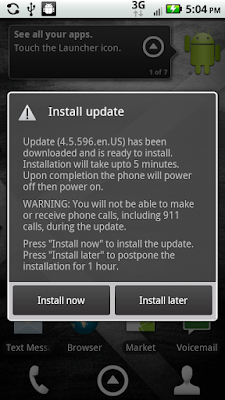
And, success....

Step 4 - Restore Data & Apps
Go to the Android Market and install your backup software (in my case its MyBackup), then restore your data and apps.
NOTE: after the OTA update to Gingerbread my Droid wouldnt actually charge, although it said it was charging. In an earlier step I addressed wiping the cache partition - which did the trick when I had this problem previously. At this point I was a bit concerned, but a simple battery pull corrected the issue and its working great now.
Happy Androiding with Gingerbread on your Droid X.... Oh, and stay tuned as I will definitely post detailed instructions on how to remove the crapware (CityID, Blockbuster, VZ Navigator, etc.) from Gingerbread soon as I figure it out.
NOTE: Make sure your battery is full or as close as possible before proceeding as it can take a while (30 minutes or more) and the battery doesnt charge during most of these steps.
- Connect your Droid via USB cable.
- Launch RSD Lite.
- Reboot Droid into Boot Loader (pull battery, or use power button to turn off; hold volume down and camera buttons, and press & release power button - continue holding volume down and camera buttons until triangle with exclamation point icon appears). Once Droid is in boot loader it should be listed as an available device in RSD Lite. The Droids bootloader screen looks something like this:
Bootloader
2C.5C
Battery OK
OK to Program
Transfer Mode:
USB
- In RSD Lite select the device (Droid) and browse to the SBF file downloaded previously, then press Start.
- Sit back and let RSD Lite do its thing.
After RSD Lite is done the Droid will restart, however you will likely just get to the animated red Droid Eye, sit there for a couple minutes & reboot over and over again. At this point you need to wipe the phone, and since you have a good backup it shouldnt be too painful... Right.!? To wipe the phone power it off (have to pull the battery), then press and hold the home button and power button (you can let the power button go after a couple seconds, but must continue to hold the home button). This will take you to the Android system recovery utility. Next, press both up/down volume buttons at the same time to display the menu, then press the down volume button to select "wipe data/factory reset" and press the camera button. You will be presented with at least one warning that you will lose all data, but since you have it backed up you should feel pretty good about proceeding.
NOTE: While in the Android system recovery utility you will also want to "wipe cache partition" as not doing so may cause your battery not to charge after completing these steps.
Finally, reboot the system.
After the phone boots you will have to follow the prompts to activate the phone with Verizon.
Step 3 - Droid X OTA Update
This is perhaps the easiest part - doing a standard OTA update. On the phone go to Setting, About Phone, System Updates and download the Gingerbread (4.5.596) update. Once downloaded install it.
And, success....
Step 4 - Restore Data & Apps
Go to the Android Market and install your backup software (in my case its MyBackup), then restore your data and apps.
NOTE: after the OTA update to Gingerbread my Droid wouldnt actually charge, although it said it was charging. In an earlier step I addressed wiping the cache partition - which did the trick when I had this problem previously. At this point I was a bit concerned, but a simple battery pull corrected the issue and its working great now.
Happy Androiding with Gingerbread on your Droid X.... Oh, and stay tuned as I will definitely post detailed instructions on how to remove the crapware (CityID, Blockbuster, VZ Navigator, etc.) from Gingerbread soon as I figure it out.
Available link for download
Subscribe to:
Posts (Atom)